

From On-Prem to Cloud: Building a More Reliable Analytics Platform with Citrix Cloud
.jpg)
Modern analytics platforms demand secure, scalable access to applications – without the operational drag of managing sprawling on-premises infrastructure. As LiveRamp’s Analytics Environment continues to grow across regions and teams, maintaining virtual desktop infrastructure (VDI) at scale has become increasingly complex and resource-intensive.
This post walks through our migration from a largely self-managed Citrix deployment to Citrix Desktops as a Service (DaaS) on Citrix Cloud. We’ll break down the architectural changes, highlight the operational and reliability gains, and explain how we preserved user experience and identity workflows while significantly reducing maintenance overhead.
Key Takeaways
- Cloud migration simplified infrastructure. Moving to Citrix Cloud reduced on-prem VMs and eliminated more than 20 managed services.
- Reliability improved by design. Cloud-managed control-plane services removed multiple single points of failure.
- Operational overhead dropped significantly. Upgrades, patching, licensing, and certificate renewals are now fully managed by Citrix.
- User experience became seamless. Browser-based access replaced local installations, reducing friction and support issues.
What is Citrix Cloud?
Citrix DaaS is a cloud-based desktop virtualization solution offered by Citrix. It enables organizations to deliver virtual desktops and applications to end-users from the cloud, eliminating the need for on-premises infrastructure and providing flexibility and scalability. Using Citrix DaaS, you can deliver secure virtual apps and desktops to any device, leaving most of the installation, setup, and upgrades to Citrix.
With Citrix DaaS, Citrix operates and maintains core control-plane services, including delivery controllers, gateways, licensing, monitoring, and updates, while customers retain control over identity, workloads, and policies. This model provides improved scalability, simplified operations, and consistent access to secure virtual apps from any device.
Component comparison: On-premises vs. Citrix Cloud
Citrix Cloud Architecture overview
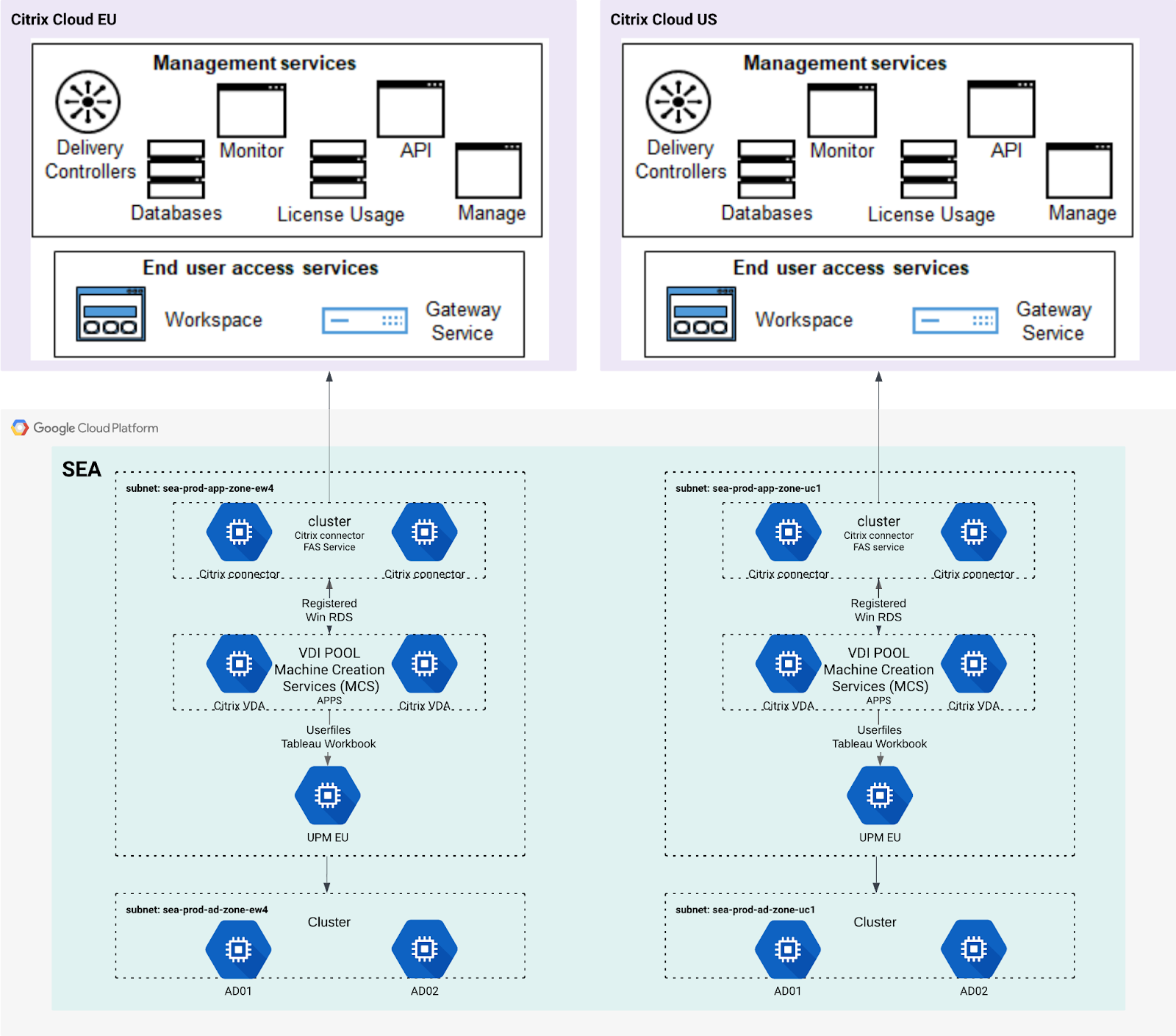
Figure 1: Infrastructure of analytics environment on Citrix Cloud (all regions)
As shown in the architecture diagram, most management and control-plane responsibilities are handled directly by Citrix Cloud. On our side, the only required infrastructure within GCP is a pair of lightweight Citrix Cloud Connector VMs to enable secure communication between Citrix Cloud and our internal resources. Existing Active Directory and user profile management systems are reused, minimizing changes to identity and profile storage.
To support regional isolation, such as between the U.S. and EU, we implemented strict physical controls and account-level separation. Each region operates in its own GCP environment, and Citrix Cloud leverages separate accounts to maintain isolation.
Key benefits of Citrix Cloud
Migrating to Citrix Cloud wasn’t just a technical upgrade as it simplified our infrastructure, reduced operational burden, and improved reliability. By moving core components to a fully managed, browser-based model, we strengthened system resilience while delivering a smoother user experience with these four key benefits:
- Reduced dependency on on-premises systems
- Fewer single points of failure
- Lower operational overhead
- Improved user experience
Reduced dependency on on-premises systems
By migrating core Citrix components to the cloud, we significantly reduced the number of servers required in GCP. Across the US and EU environments, this eliminated at least eight VMs, including:
- Two NetScaler machines
- Four Delivery Controller machines
- Two database servers
In total, more than 20 services previously managed on-premises were removed or offloaded to Citrix Cloud.
Fewer single points of failure
Previously, components such as NetScaler gateways, database servers, license services, SSL certificates, and SSO services represented potential single points of failure. With Citrix Cloud, these services are fully managed and highly available by default, effectively eliminating many infrastructure-level failure risks from our environment.
Lower operational overhead
Before the migration, routine maintenance tasks occurred frequently, including:
- NetScaler upgrades (every few months)
- Windows patching (biweekly)
- Citrix Controller and StoreFront upgrades (annually)
- SSL certificate renewals (annually)
- License renewals (annually)
After transitioning to Citrix Cloud, these responsibilities are handled entirely by the service. This change dramatically reduced operational effort, eliminated planned downtime for upgrades, and improved overall system reliability.
Improved user experience
Previously, users were required to download, install, and maintain the Citrix Workspace client on their local machines. This often introduced friction related to permissions, connectivity, and version compatibility. With Citrix Cloud, users now access applications directly through a web browser – no client installation required – delivering a true browser-based experience with fewer support issues.
Cloud Citrix Deployment and integration
Citrix Cloud deployment
The Citrix Cloud environment is deployed independently of the existing on-premises infrastructure. Account setup, licensing, and workspace configuration are managed entirely within Citrix Cloud.
Infrastructure resources are provisioned using Terraform, with Windows machine configuration handled manually. We use Google Cloud snapshots for backups and rely on OpenTelemetry (Otel) and Grafana to monitor system health and service performance.
Integration with Analytics Environment
To ensure a seamless transition and improved user experience, several key integrations were required:
Active Directory account retention
Citrix Cloud supports SAML-based authentication, allowing us to reuse our existing on-premises Active Directory. This preserves all user accounts and permissions without requiring directory migration.
SAML authentication flow
In Analytics Environment, CAS acts as the identity provider and integrates with LiveRamp’s Okta instance. The authentication flow is:
Okta → CAS → Citrix Workspace → Active Directory
This process is fully automated. From a user perspective, authentication is completed simply by clicking the Citrix Cloud icon.
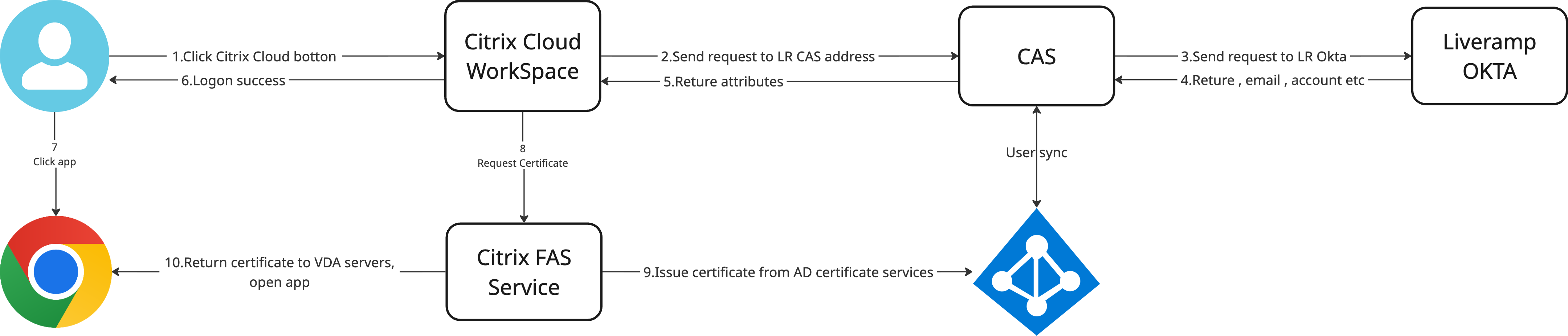
Figure 2: Citrix Cloud, CAS, and LiveRamp Okta SAML integration
User experience and profile preservation
Seamless user transition
The deployment does not disrupt existing users. Even after migration, users can choose between on-premises (if retained) and cloud-based environments. To achieve this, Citrix user profiles and Analytics Environment application management are critically important.
Citrix policies redirect user profiles, such as Chrome bookmarks and cookies, to their original storage locations. This ensures users experience a transparent transition with no noticeable changes to their applications or settings.
Updated login flow
A new Citrix Cloud option is available within the Analytics Environment portal, allowing users to switch environments easily and launch applications directly. After selecting Citrix Cloud, users are redirected to the Citrix Workspace page, where they can launch multiple applications simultaneously, each opening in its own browser tab.
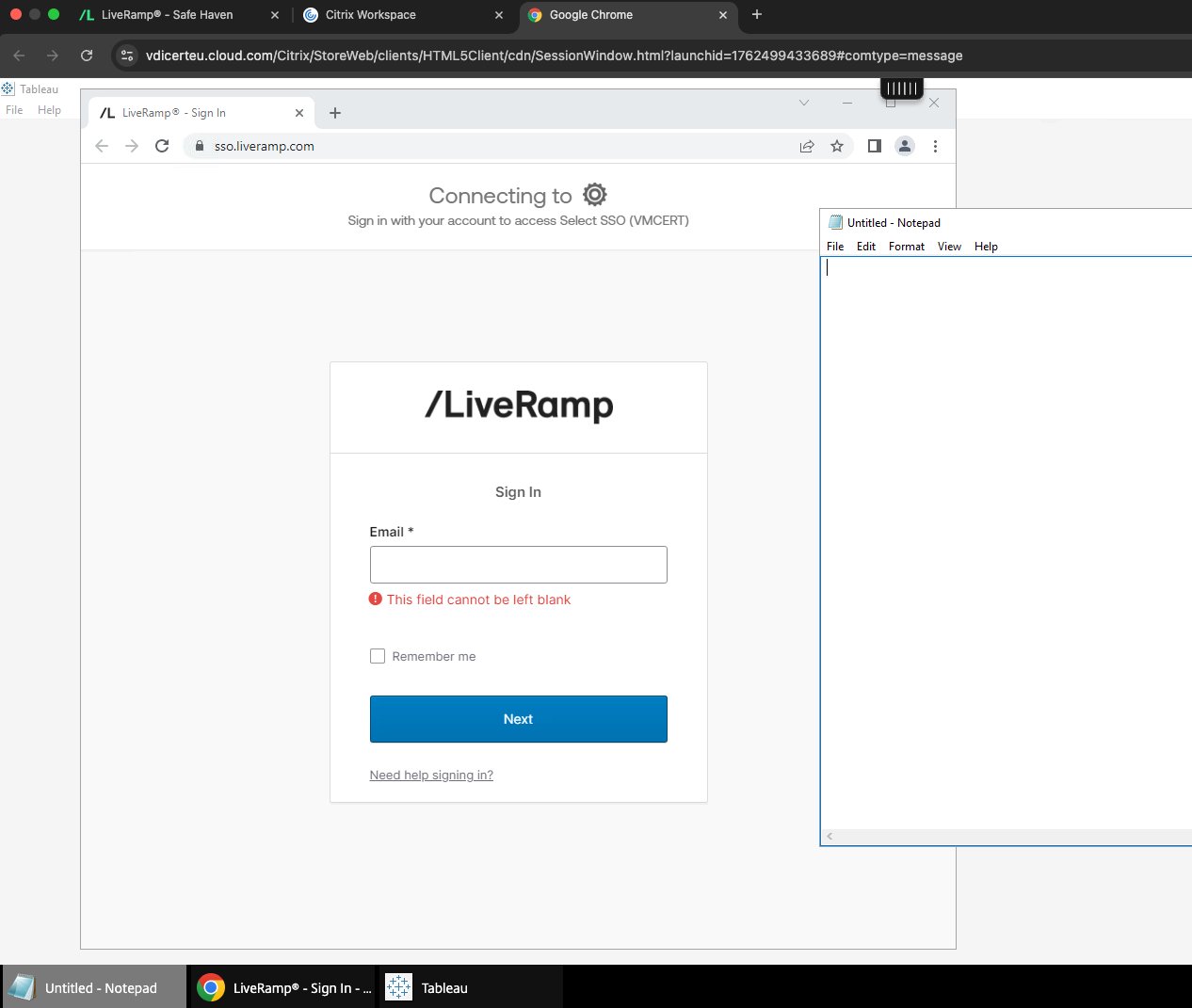
Figure 3: Accessing Analytics Environment via Citrix Cloud in Google Chrome
See operational impact with Citrix Cloud and LiveRamp
By migrating to Citrix Cloud, we simplified our VDI architecture while improving reliability, scalability, and operational efficiency. Shifting control-plane management to Citrix reduced infrastructure complexity, eliminated multiple single points of failure, and freed engineering teams to focus on platform stability and analytics workflows instead of routine maintenance.
For LiveRamp clients, this translates directly into a more resilient and secure Analytics Environment. Higher availability, fewer access disruptions across regions, and faster, automated upgrades support consistent performance as data volumes and usage scales – ensuring LiveRamp’s essential role to critical data collaboration and analytics workloads.
For more technical reviews and implementation guides, check out LiveRamp’s engineering blogs or reach out to ops@liveramp.com.
{{data-collaboration-use-cases}}
Citrix Cloud FAQs
What is Citrix Cloud (Citrix DaaS)?
Citrix Cloud, also known as Citrix Desktops as a Service (DaaS), is a cloud-based virtual desktop solution that delivers secure apps and desktops without requiring on-premises control-plane infrastructure.
What are the benefits of migrating from on-prem Citrix to Citrix Cloud?
Migrating to Citrix Cloud reduces infrastructure complexity, eliminates single points of failure, lowers maintenance overhead, and improves scalability and reliability.
How does Citrix Cloud improve VDI reliability?
Citrix Cloud manages delivery controllers, gateways, licensing, monitoring, and updates in a highly available cloud environment, reducing infrastructure-level risks.
Does Citrix Cloud require users to install a client?
No. Users can access applications through a web browser, eliminating the need to install and maintain the Citrix Workspace client locally.
How does Citrix Cloud support secure authentication?
Citrix Cloud supports SAML-based authentication and integrates with identity providers like Okta and Active Directory to preserve existing user accounts and permissions.
